rjsf provides an R interface to Jump-Switch-Flow (JSF),
a hybrid simulation framework for compartmental models that combines
stochastic jump dynamics at low populations with deterministic flow
dynamics at high populations.
Important: rjsf is an R interface;
running simulations requires the Python Jump-Switch-Flow backend to be
installed and accessible through reticulate.
The main function is jsf_simulate(), which lets users
define compartmental reaction models in R, run simulations using the
Python jsf backend, and return the output as either a
regular data.frame or a structured JSFResult
object.
Development of rjsf commenced as part of the Google Summer of
Code 2026 (GSoC 2026) program.
Once available on CRAN, you can install the released version of
rjsf with:
install.packages("rjsf")You can install the development version from GitHub with:
# install.packages("pak")
pak::pak("olivervu25/rjsf")
Running simulations also requires the Python Jump-Switch-Flow backend. See Python setup below.
rjsf uses reticulate to communicate with
the Python jsf package. The Python backend must therefore
be installed in the same Python environment used by
reticulate.
A recommended setup is to create a local virtual environment:
python3 -m venv .venv
source .venv/bin/activate

python -m pip install --upgrade pip setuptools wheel
python -m pip install numpy scipy pandas matplotlib python-libsbml
python -m pip install git+https://github.com/DGermano8/jsf
Then in R, point reticulate to that environment:
Sys.setenv(RETICULATE_PYTHON = ".venv/bin/python")

library(reticulate)
py_config()
Check that the Python jsf backend is available:
library(rjsf)

jsf_available()
A correctly configured environment should return:
[1] TRUEYou can also create and configure the Python environment directly from R:
library(reticulate)

virtualenv_create("rjsf-env")

py_install(
  packages = c(
    "numpy",
    "scipy",
    "pandas",
    "matplotlib",
    "python-libsbml"
  ),
  envname = "rjsf-env",
  method = "virtualenv"
)

py_install(
  packages = "git+https://github.com/DGermano8/jsf",
  envname = "rjsf-env",
  method = "virtualenv",
  pip = TRUE
)

use_virtualenv("rjsf-env", required = TRUE)
Then check:
library(rjsf)

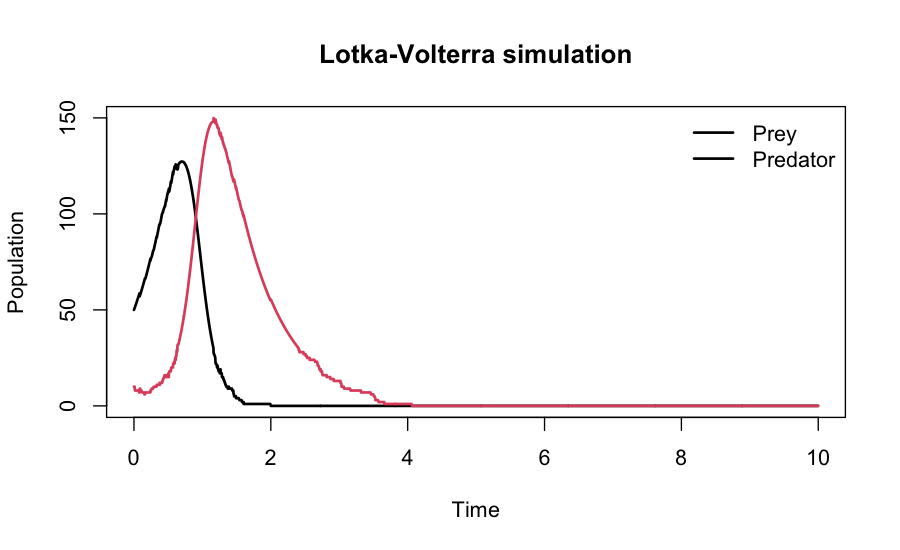
jsf_available()The following example simulates a Lotka-Volterra predator-prey system
and returns a structured JSFResult object.
library(rjsf)
library(reticulate)

rates_lv <- reticulate::py_eval(
  "lambda x, t: [2.0 * x[0], 1.5 * x[1], 0.05 * x[0] * x[1]]"
)

result <- jsf_simulate(
  x0 = c(prey = 50, predator = 10),
  rates = rates_lv,
  reactant = matrix(
    c(
      1, 0,
      0, 1,
      1, 1
    ),
    ncol = 2,
    byrow = TRUE
  ),
  product = matrix(
    c(
      2, 0,
      0, 0,
      0, 2
    ),
    ncol = 2,
    byrow = TRUE
  ),
  do_disc = c(1, 1),
  t_max = 10,
  dt = 0.01,
  switching_threshold = c(30, 30),
  species_names = c("prey", "predator"),
  return_type = "JSFResult"
)

result
summary(result)
plot(result)
The simulated prey and predator trajectories can be visualised
directly from the JSFResult object:
jsf_simulate() can return either a regular data
frame:
df <- jsf_simulate(..., return_type = "data.frame")or a structured JSFResult object:
result <- jsf_simulate(..., return_type = "JSFResult")A JSFResult stores simulation trajectories and
associated metadata and supports standard methods including:
print(result)
summary(result)
plot(result)See the Getting started with rjsf vignette for complete Lotka-Volterra and SIR examples, including model specification, Python setup, simulation, and result inspection.
If you use rjsf in your work, please cite both the
rjsf package and the original Jump-Switch-Flow
methodology.
You can obtain the recommended citations in R with:
citation("rjsf")The upstream Python implementation of Jump-Switch-Flow is available at:
https://github.com/DGermano8/jsf