




Turn numbers into people. Turn data into stories.
ggpop is an R package built on top of ggplot2 that
simplifies the creation of icon-based population charts. By combining
features from ggplot2 and ggimage,
ggpop lets users visualize population data using
customizable icons arranged in circular layouts. Designed primarily for
visual storytelling, ggpop helps users communicate population statistics
in an appealing manner.
geom_pop() — proportional population
charts · geom_icon_point() — icon scatter plots
New in 1.9.0 —
marker_encode()turns data values into marker names, andlegend_spec()/legend_render()build composite legends with external colour keys. Custom SVG icons (ggpop_markers(),icon_path) andmarker_legend()arrived in 1.8.0. See the Legends article.
ggpop makes population data easier to remember, allowing
users to tell more compelling stories.
geom_pop() and unlimited for
geom_icon_point()Two geoms for different visualization problems:
geom_pop() |
geom_icon_point() |
|
|---|---|---|
| Best for | Population & proportion data | Any x / y scatter data |
| Layout | Circular proportional grid | Free x / y positioning |
| What one icon means | A fixed share of the total population | A single observation |
| Data prep needed | Yes — run process_data()
first (optional) |
No — plug in any data directly |
| Think of it as | A pictogram / isotype chart | geom_point() with icons |
You can install ggpop from CRAN with:
install.packages("ggpop")Development version of the package can be installed from GitHub with:
install.packages("remotes")
remotes::install_github("jurjoroa/ggpop")
geom_pop() — Population
Chartsgeom_pop() creates proportional icon grids where each
icon represents a share of the total population.
The dataset df_pop_mx is a
minimal example illustrating population counts by sex
in Mexico in 2024.
"male" / "female")"Mexico""America"library(dplyr)
library(ggpop)
df_pop_mx <- data.frame(sex = c("male", "female"),
n = c(63459580, 67401427),
country = "Mexico",
continent = "America")| Sex | Population (n) | Country | Continent |
|---|---|---|---|
| Male | 63,459,580 | Mexico | America |
| Female | 67,401,427 | Mexico | America |
df_pop_mx_prop <- process_data(data = df_pop_mx,
                               group_var = sex,
                               sum_var = n,
                               sample_size = 1000)
We apply the process_data() function to the population
data df_pop_mx with the following parameters:
n
(population counts) for group totals. This is the variable that will be
summed up to calculate proportions.The function calculates group proportions, then performs sampling to
create a new data frame (df_pop_mx_prop). Each row
represents one draw from the 1,000 samples. Notable columns:
Note:
process_data()is optional. You can pass your own data frame directly togeom_pop()— as long as each row represents one icon. The maximum is 1,000 rows per plot (you can pass more only if you doing per facet group).
Assign a Font Awesome icon name to each group:
df_pop_mx_prop <- df_pop_mx_prop %>%
  mutate(icon = case_when(
    type == "male" ~ "male",
    type == "female" ~ "female"))
Whatever you map to icon can come from three sources — and
you can mix them in a single plot:
home ·
user · envelope · bell ·
camera · cog · heart ·
calendar · check · cloud ·
comment · download · flag ·
folder · phone
|

|
Search from R, or browse the Font Awesome gallery:
fa_icons(query = "person")   # search Font Awesome names
ggpop_markers()              # list bundled markers (and your own via icon_path)
Custom SVGs and bundled markers are new in 1.8.0 — see the Legends & custom markers article.
library(ggplot2)

ggplot() +
  geom_pop(data = df_pop_mx_prop, aes(icon = icon, color = type),
           size = 1, arrange = FALSE, legend_icons = FALSE) +
  theme_void() +
  theme(legend.position = "bottom")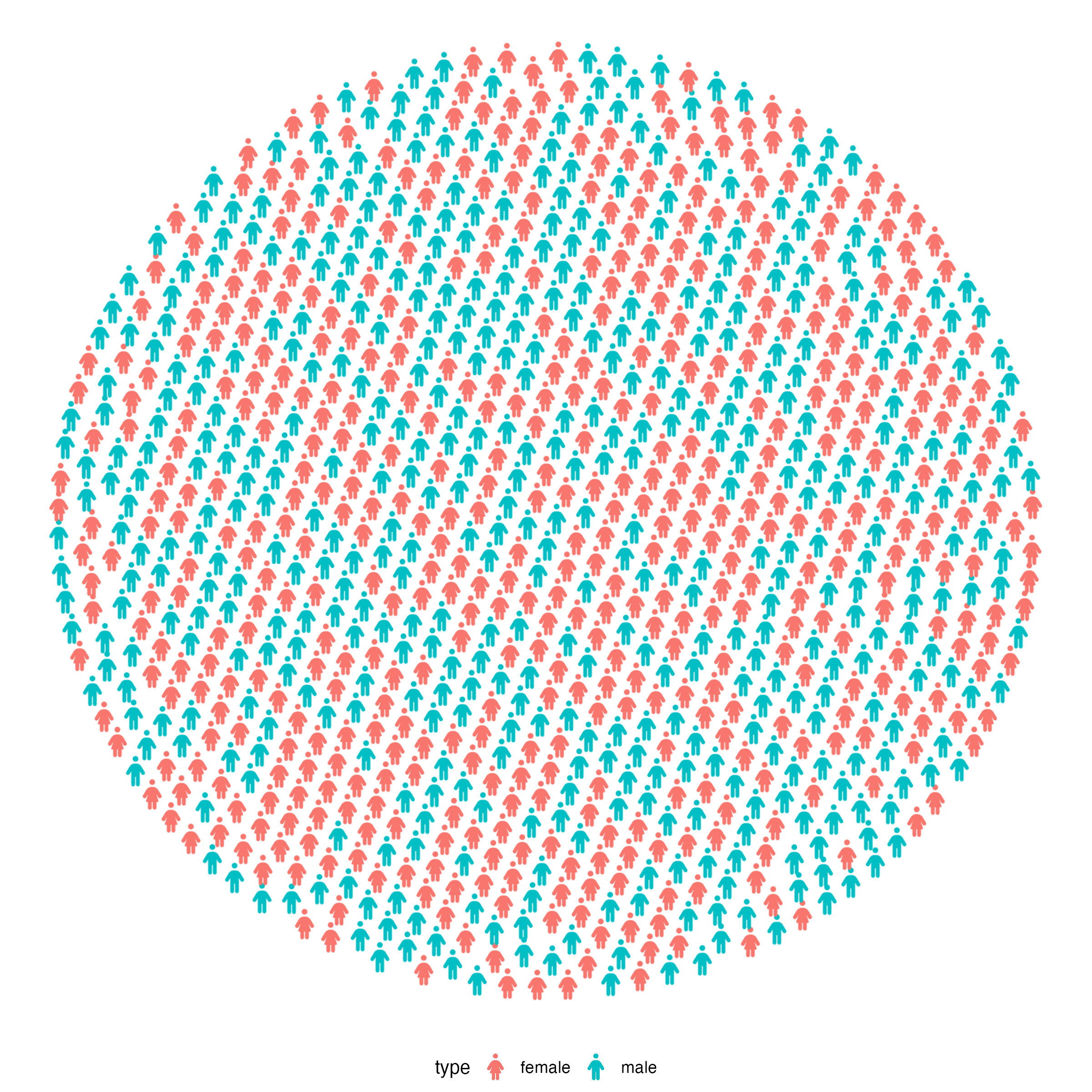
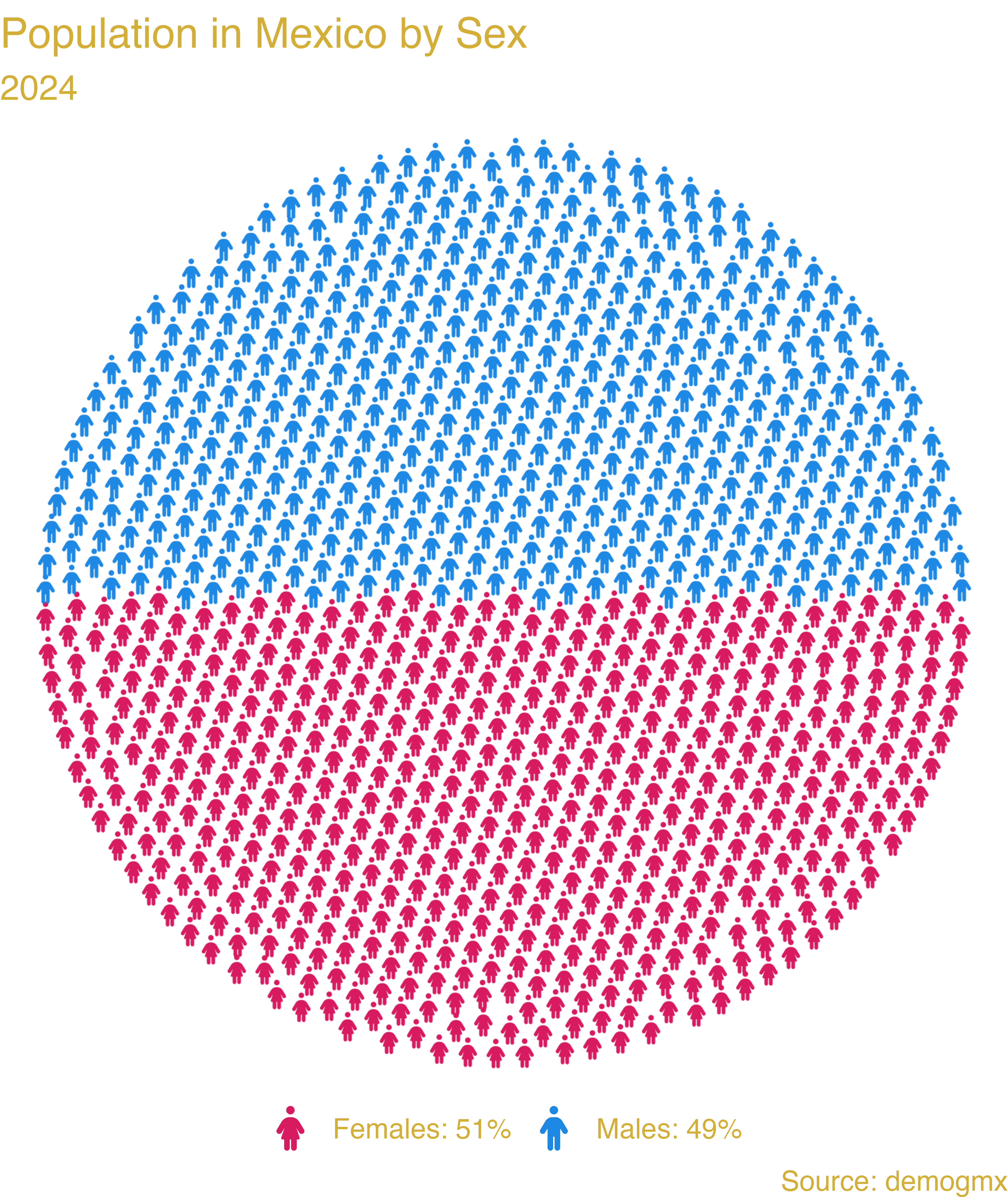
ggplot(data = df_pop_mx_prop, aes(icon = icon, color = type)) +
  geom_pop(size = 1, arrange = TRUE) +
  theme_void(base_size = 40) +
  theme(legend.position = "bottom") +
  labs(title = "Population in Mexico by Sex",
       subtitle = "2024",
       caption = "Source: demogmx") +
  theme(legend.title = element_blank(),
        plot.background = element_blank(),
        panel.background = element_blank(),
        legend.background = element_blank(),
        legend.text = element_text(color = "#D4AF37"),
        plot.title = element_text(color = "#D4AF37"),
        plot.subtitle = element_text(color = "#D4AF37"),
        plot.caption = element_text(color = "#D4AF37")) +
  scale_legend_icon(size = 10) +
  scale_color_manual(values = c("male" = "#1E88E5", "female" = "#D81B60"),
labels = c("female" = "Females: 51%", "male" = "Males: 49%"))Multiple icon types in the same plot:
#1.- We load or create the data
df_pop_dis_mx <- data.frame(sex = c("male", "female", "disabled males",
                                    "disabled females"),
                            value = c(53726732, 54978806, 9731396, 11106712),
                            country = "Mexico",
                            continent = "America")

#2.- We process the data
df_pop_dis_mx_prop <- process_data(data = df_pop_dis_mx, group_var = sex,
                                   sum_var = value, sample_size = 500)

#3.- Assign icons to groups
df_pop_dis_mx_prop <- df_pop_dis_mx_prop %>%
  mutate(icon = case_when(
    type == "male" ~ "male",
    type == "female" ~ "female",
    type == "disabled males" ~ "wheelchair",
    type == "disabled females" ~ "wheelchair"))

#4.- Plot

library(showtext)
font_add_google("Quicksand", "quicksand")
showtext_auto()

ggplot(data = df_pop_dis_mx_prop, aes(icon = icon, color = type)) +
  geom_pop(size = 1.1, arrange = FALSE) +
  theme_pop(base_size = 100, base_family = "quicksand") +
  scale_legend_icon(size = 10,
                    legend.text = element_text(color = "#D4AF37",
                                               family = "quicksand"),
                    plot.title = element_text(color = "#D4AF37",
                                               family = "quicksand",
                                              face = "bold", size = 90,
                                              hjust = 0.5),
                    plot.subtitle = element_text(color = "#D4AF37",
                                                 family = "quicksand",
                                                 size = 70, hjust = 0.5),
                    plot.caption = element_text(color = "#D4AF37",
                                                family = "quicksand",
                                                size = 70, hjust = 0)) +
  labs(title = "Population in Mexico by Sex and disability status",
       subtitle = "2023",
       caption = "As of 2023, 16% of the population in Mexico
                  has some form of disability.") +
  theme(legend.position = "bottom", legend.title = element_blank(),
        legend.box.spacing = unit(-.4, "cm"),
        legend.margin = margin(t = 0, b = 0),
        legend.box.margin = margin(t = 0, b = 0)) +
  scale_color_manual(values = c("male" = "#1E88E5", "female" = "#D81B60",
                                "disabled males" = "#90CAF9",
                                "disabled females" = "#F48FB1"),
                     labels = c("male" = "Males", "female" = "Females",
                                "disabled females" = "Disabled Females",
                                "disabled males" = "Disabled Males"))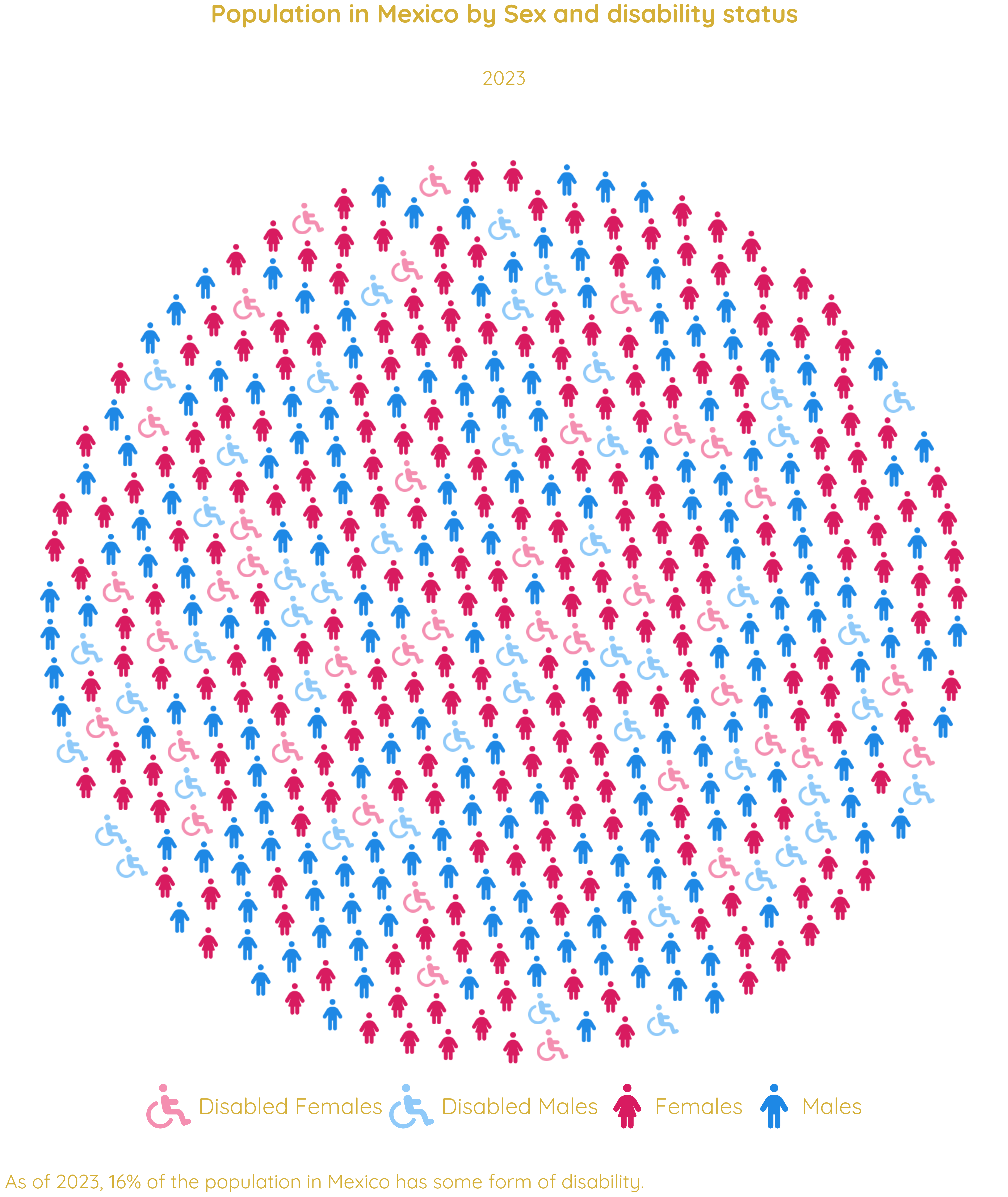
geom_icon_point() —
Icon Scatter Plotsgeom_icon_point() works like geom_point()
but replaces dots with icons. No preprocessing required.
geom_pop()process_data() step needed — works with raw
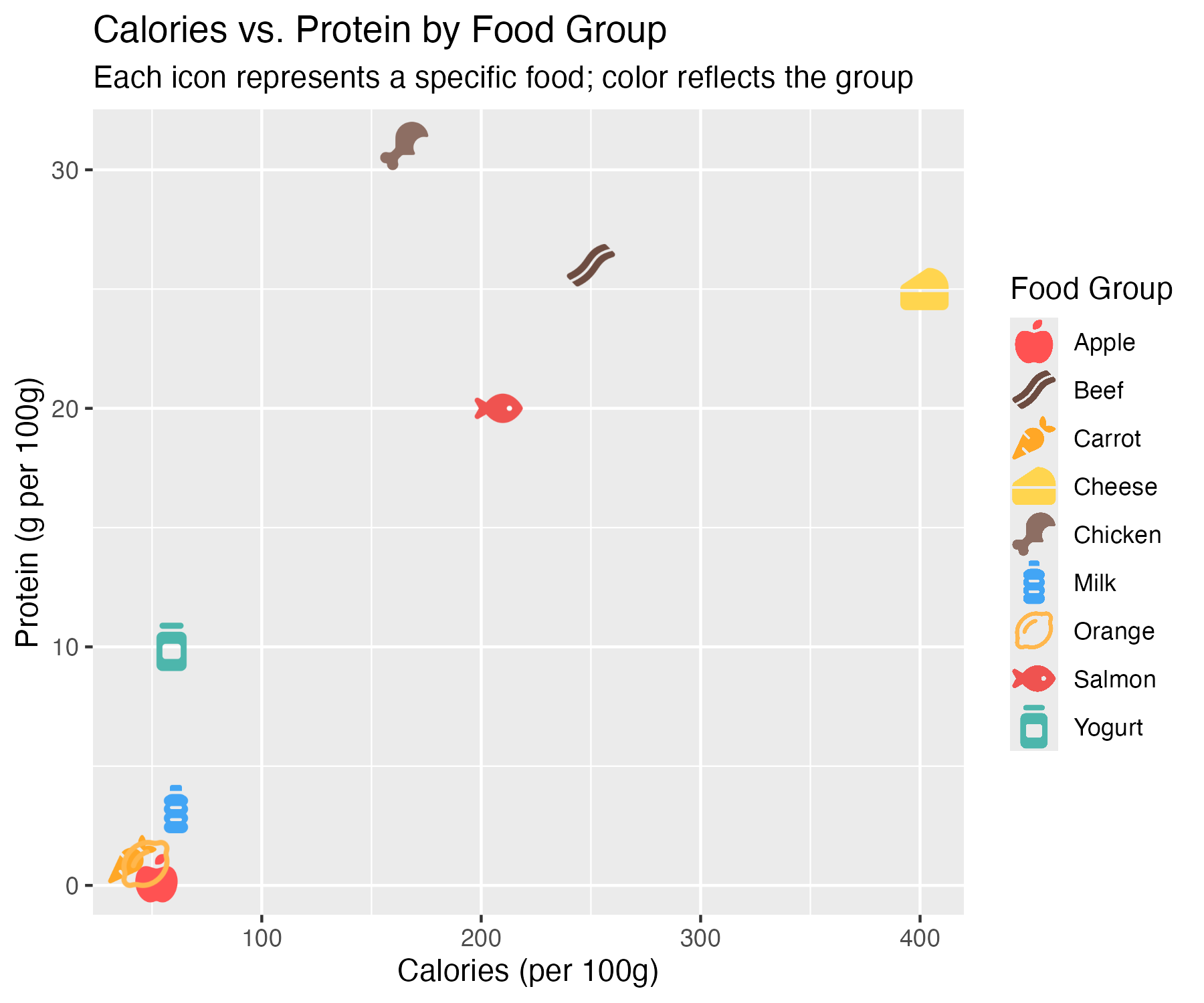
dataEach food item plotted by calorie and protein content, with a matching icon and color by category.
library(ggplot2)
library(ggpop)

df_food <- data.frame(
  food     = c("Apple", "Carrot", "Orange", "Chicken", "Beef", "Salmon",
               "Milk", "Cheese", "Yogurt"),
  calories = c(52, 41, 47, 165, 250, 208, 61, 402, 59),
  protein  = c(0.3, 1.1, 0.9, 31, 26, 20, 3.2, 25, 10),
  group    = c(rep("Fruit", 3), rep("Meat", 3), rep("Dairy", 3)),
  icon     = c("apple-whole", "carrot", "lemon",
               "drumstick-bite", "bacon", "fish",
               "bottle-water", "cheese", "jar")
)

ggplot(df_food, aes(x = calories, y = protein, icon = icon, color = food)) +
  geom_icon_point(size = 2, dpi = 100) +
  scale_color_manual(values = c(
    "Apple" = "#FF5252", "Carrot" = "#FFA726", "Orange" = "#FFB74D",
    "Chicken" = "#8D6E63", "Beef" = "#6D4C41",
    "Salmon" = "#EF5350", "Milk" = "#42A5F5", "Cheese" = "#FFD54F",
    "Yogurt" = "#4DB6AC"
  )) +
  labs(
    title = "Calories vs. Protein by Food Group",
    subtitle = "Each icon represents a specific food; color reflects the group",
    x = "Calories (per 100g)",
    y = "Protein (g per 100g)",
    color = "Food Group"
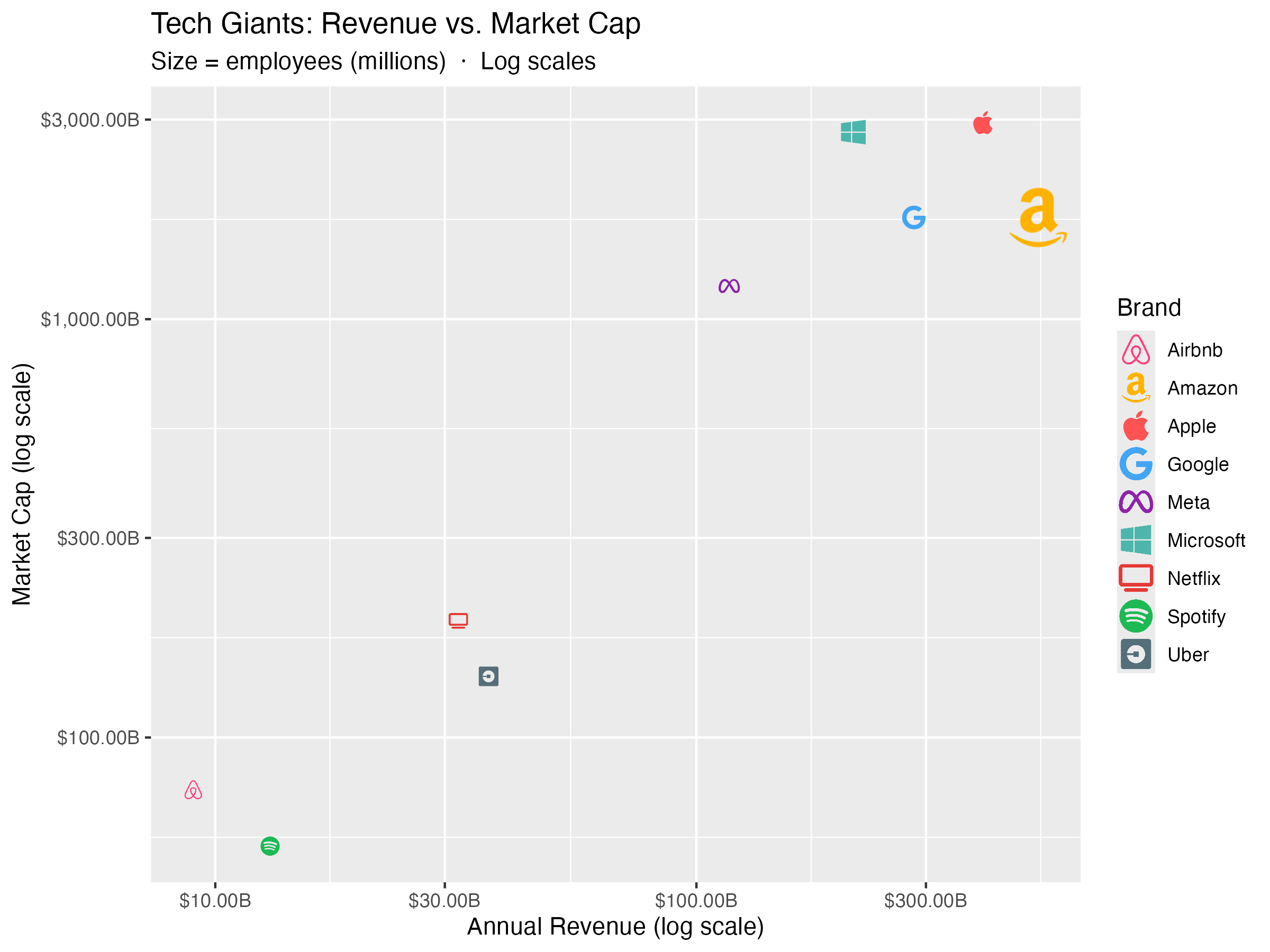
)Icon size mapped to number of employees.
library(ggplot2)
library(ggpop)

df_brand <- data.frame(
  brand      = c("Apple", "Google", "Microsoft", "Meta", "Amazon",
                 "Netflix", "Spotify", "Uber", "Airbnb"),
  revenue    = c(394, 283, 212, 117, 514, 32, 13, 37, 9),
  market_cap = c(2950, 1750, 2800, 1200, 1750, 190, 55, 140, 75),
  employees  = c(160, 180, 220, 86, 1540, 13, 9, 32, 6),
  sector     = c("Hardware", "Search", "Cloud", "Social", "Commerce",
                 "Streaming", "Streaming", "Mobility", "Mobility"),
  icon       = c("apple", "google", "windows", "meta", "amazon",
                 "tv", "spotify", "uber", "airbnb")
)

df_brand <- scales::rescale(df_brand, to = c(0.8, 2.5))

ggplot(df_brand, aes(x = revenue, y = market_cap,
                       icon = icon, color = brand, size = size_scaled)) +
  geom_icon_point(dpi = 120) +
  scale_x_log10(labels = scales::dollar_format(suffix = "B")) +
  scale_y_log10(labels = scales::dollar_format(suffix = "B")) +
  scale_color_manual(values = c(
    "Apple"     = "#FF5252", "Google"    = "#42A5F5",
    "Microsoft" = "#4DB6AC", "Meta"      = "#8E24AA",
    "Amazon"    = "#FFB300", "Netflix"   = "#E53935",
    "Spotify"   = "#1DB954", "Uber"      = "#546E7A",
    "Airbnb"    = "#FF4081")) +
  scale_size_continuous(range = c(1, 3), labels = scales::comma) +
  labs(
    title    = "Tech Giants: Revenue vs. Market Cap",
    subtitle = "Size = employees (millions)  ·  Log scales",
    x        = "Annual Revenue (log scale)",
    y        = "Market Cap (log scale)",
    color    = "Brand",
    size     = "Employees (M)"
  )
geom_icon_point() combined with
calculate_icers(), reference lines, and annotations.
Code available in ggpop package website.

Font Awesome is just the default. ggpop also renders
your own SVG files and a set of bundled
markers — anywhere an icon is expected, in both
geoms and the legend.
.svg files1. Put your SVGs in a folder, each file named however you want to reference it:
energy-icons/
├── solar.svg
├── wind.svg
├── hydro.svg
└── bioenergy.svg
2. Reference each file by its bare name — no
.svg, no path, exactly like a Font Awesome icon — and point
ggpop at the folder with icon_path (per layer)
or options(ggpop.icon_path = "energy-icons") (whole
session):
library(ggplot2)
library(ggpop)

df_energy <- data.frame(
  source   = c("Solar", "Wind", "Hydro", "Bioenergy"),
  icon     = c("solar", "wind", "hydro", "bioenergy"),  # = file names, without .svg
  capacity = c(1410, 1020, 1400, 150),                  # installed capacity, GW
  growth   = c(24, 13, 2, 6)                            # annual growth, %
)

ggplot(df_energy, aes(x = capacity, y = growth, icon = icon, colour = source)) +
  geom_icon_point(size = 7, icon_path = "energy-icons", legend_icons = TRUE) +
  scale_colour_manual(values = c(Solar = "#F4A300", Wind = "#2A9D8F",
                                 Hydro = "#1E88E5", Bioenergy = "#6AA84F")) +
  scale_legend_icon(size = 6) +
  labs(title = "Renewable Electricity: Scale vs. Momentum",
       x = "Installed capacity (GW)", y = "Annual growth (%)", colour = "Source") +
  theme_minimal()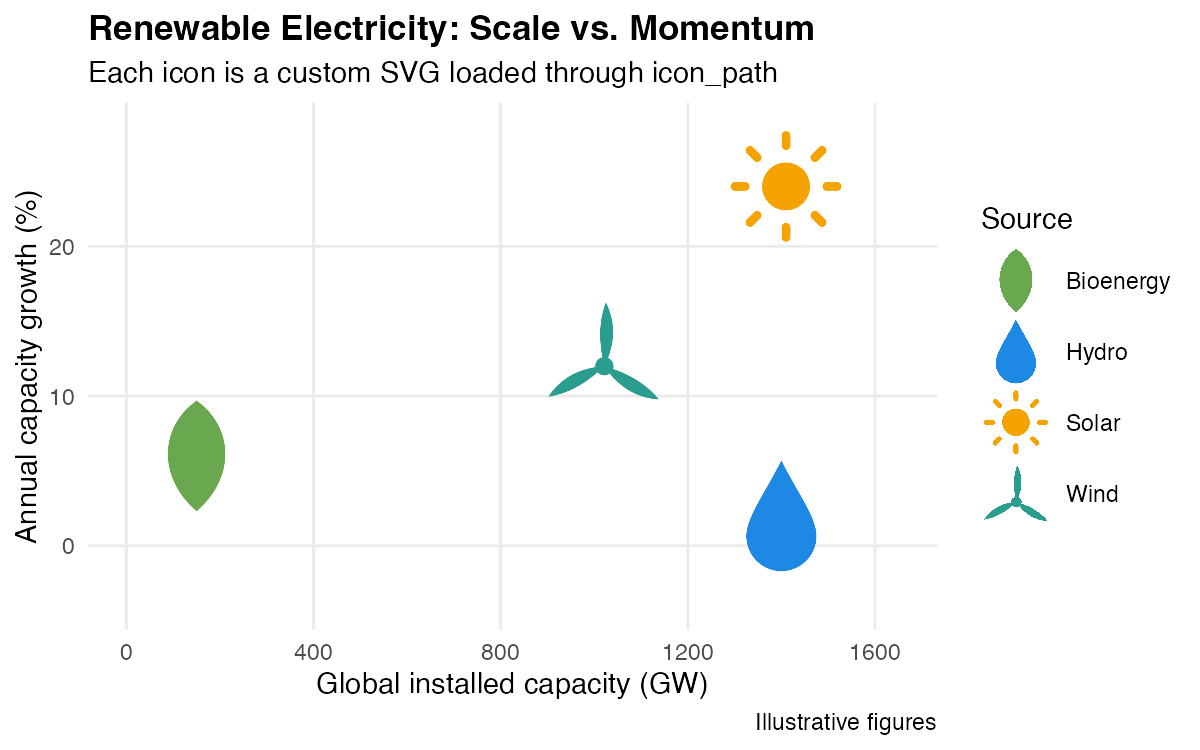
Your monochrome SVGs are recoloured per group and
carried into the legend keys. For a one-off file you can also pass a
direct path:
aes(icon = "path/to/special.svg").
ggpop ships a family of solid / outline markers
(squares, circles, diamonds, plus a few extras) — added at the request
of Claudia L. Seguin. List them and use any by name — no folder
needed:
ggpop_markers()$bundled
#>  [1] "circle-cross"        "circle-hollow"       "circle-inset"
#>  [4] "circle-solid"        "diamond-cross"       "diamond-hollow"
#>  [7] "diamond-inset"       "diamond-solid"       "plus-bold"
#> [10] "plus-hollow"         "square-cross"        "square-hollow"
#> [13] "square-inset"        "square-solid"        "triangle-down"
#> [16] "triangle-down-inset"
Monochrome SVGs — those drawn in a single colour
(#000000, currentColor, or
fill="black") — are recoloured to the mapped
colour aesthetic automatically, just like Font Awesome
icons. Multi-colour SVGs render exactly as drawn.
Resolution order for any
iconvalue: a readable.svgpath → a file inicon_path→ a bundled marker → a Font Awesome name → a clear error if none match. Full walkthrough in the Legends & custom markers article.
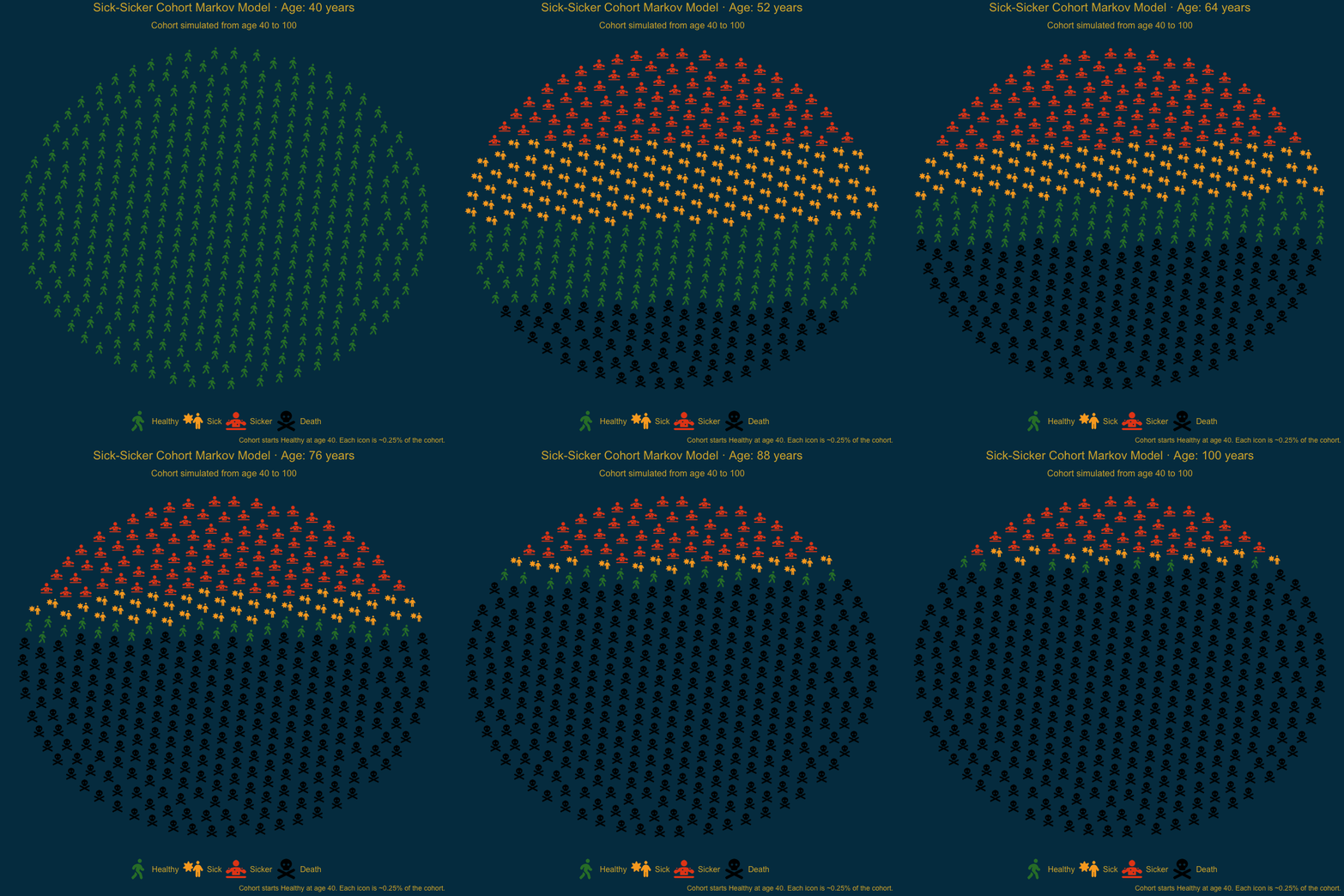
Sick-Sicker cohort animation (ages 40 to 100) built with
ggpop and gganimate:
Code available in ggpop package website.
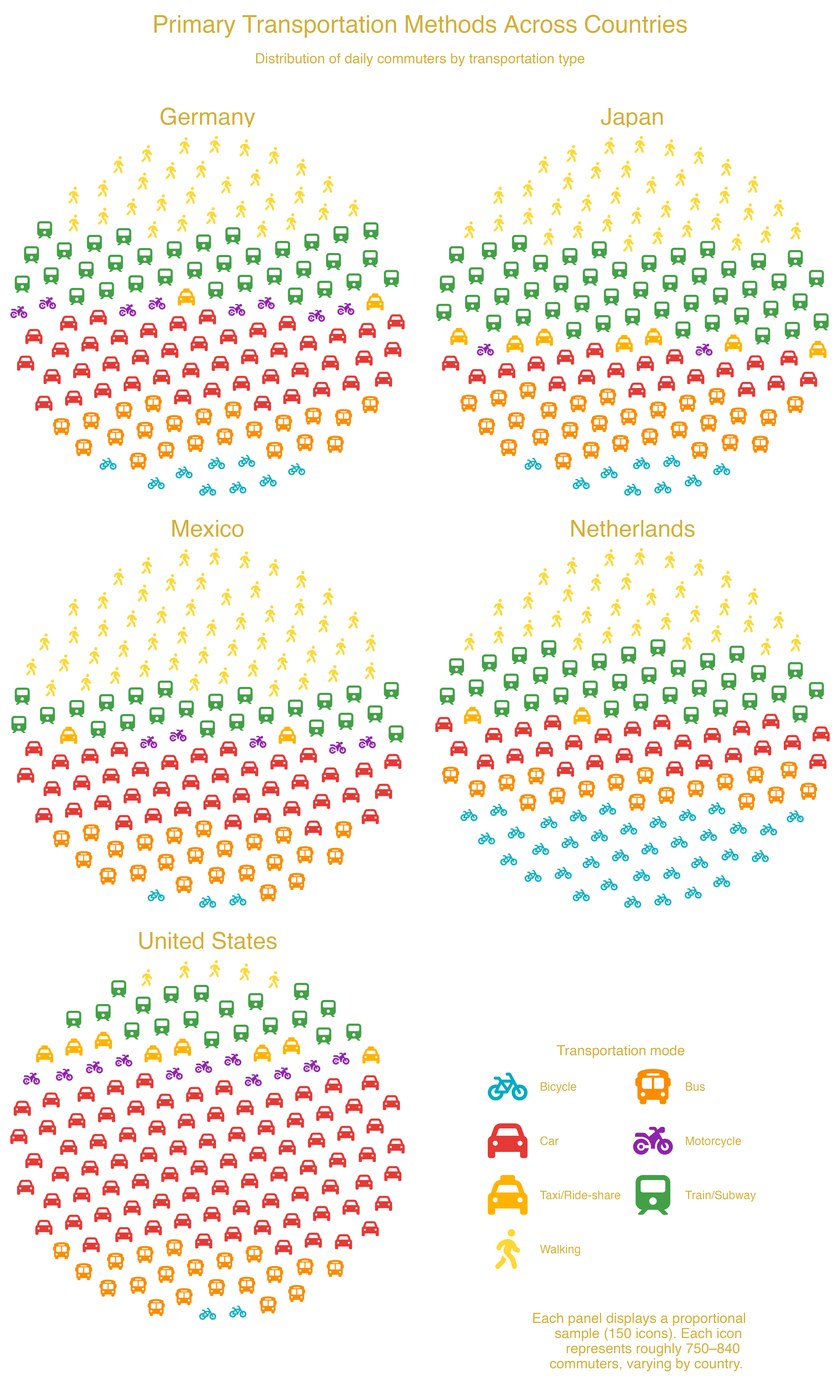
facet_wrap()
— Transportation Methods Across US CitiesTransportation methods across cities using facet_wrap():
each panel shows one city’s distribution of commute modes.
Code available in ggpop package website.
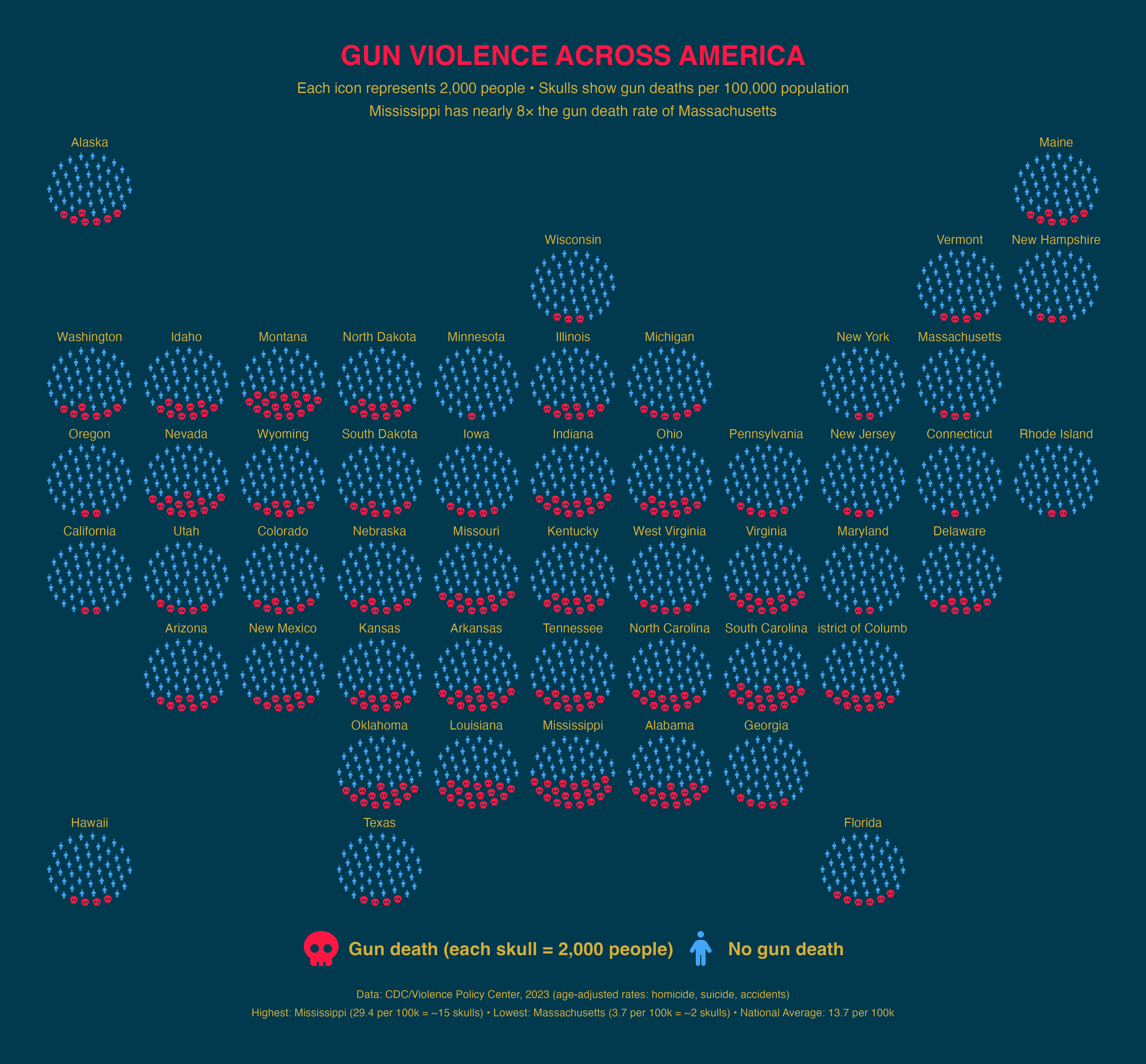
facet_geo() —
Gun Violence Across US StatesGun deaths per 100,000 people (2023 CDC data) by US state using
geofacet for geographic placement.
Code available in ggpop package website.
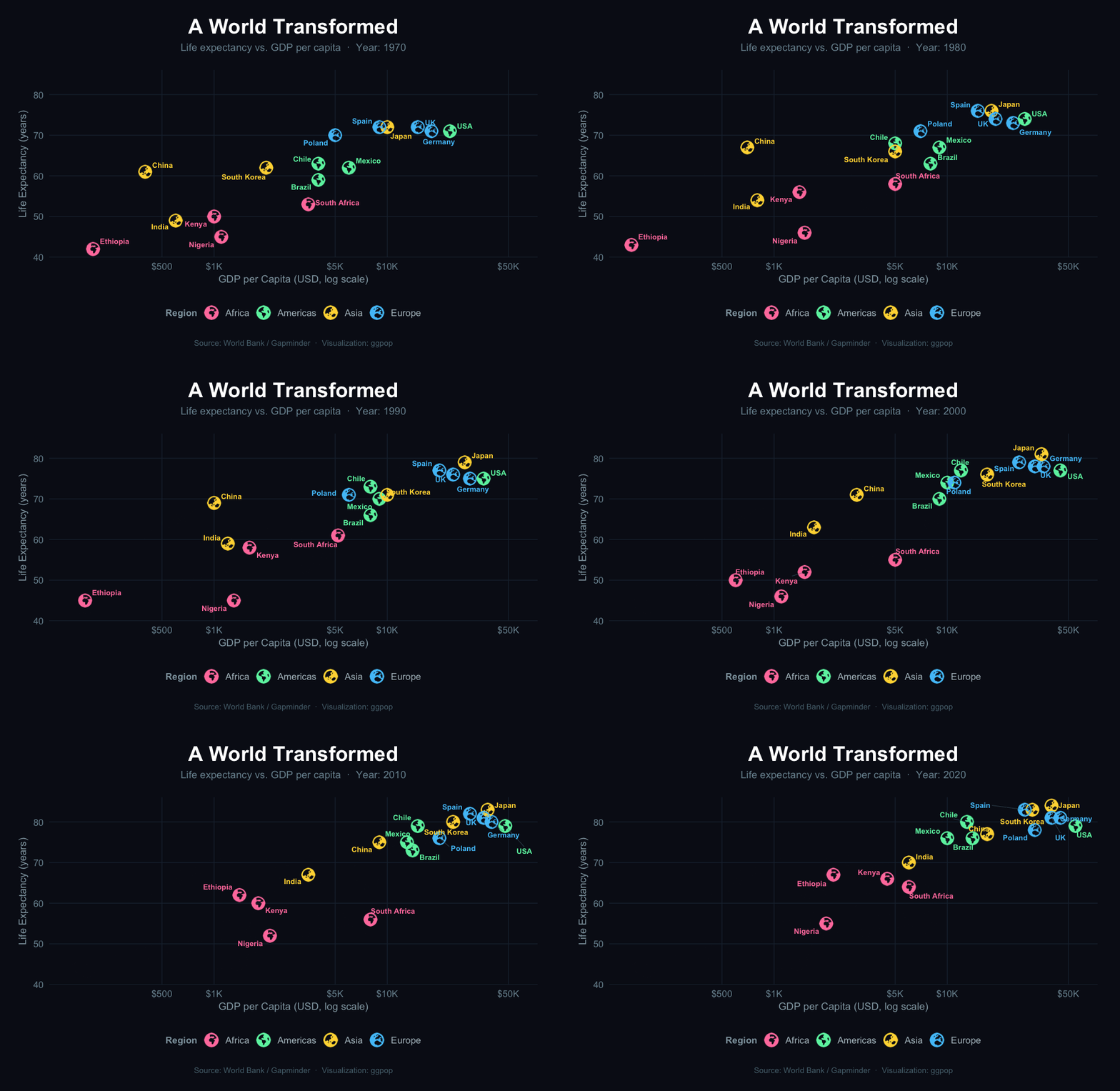
gganimate — A World
TransformedAnimated Gapminder-style: life expectancy vs. GDP per capita across five decades, with earth icons by region.
Code available in ggpop package website.
| Function / Parameter | Purpose |
|---|---|
process_data() |
Convert group counts → one row per icon;
use high_group_var for independent per-group sampling
(e.g. for faceted charts) |
fa_icons() |
Search 2,000+ Font Awesome icons from your R console |
ggpop_markers() |
List bundled SVG markers (and your own via
icon_path) usable as icons |
marker_legend() |
Build a standalone composite legend of icon markers (multi-column, mixed sources) |
theme_pop() |
Built-in minimal theme (also
theme_pop_dark(), theme_pop_minimal()) |
scale_legend_icon() |
Resize legend icons independently of the plot icons |
arrange |
geom_pop() parameter —
cluster icons by group (TRUE) or scatter randomly
(FALSE, default) |
stroke_width |
geom_pop() parameter — add an
outline to every icon, in pixels
(e.g. stroke_width = 1) |
seed |
geom_pop() parameter — fix
the random icon layout for reproducible charts
(e.g. seed = 42) |
@Manual{ggpop2024,
  title   = {ggpop: Visualizing Population Data},
  author  = {Roa-Contreras, Jorge A. and
             Soultanova, Ralitza and
             Alarid-Escudero, Fernando and
             Pineda-Antunez, Carlos},
  year    = {2024},
  note    = {R package version 1.7.0},
  url     = {https://github.com/jurjoroa/ggpop},
  license = {MIT}
}